
PSD2 compliant Strong Customer Authentication (SCA) for e-money and e-money tokens
As a licensed Institution, we are legally required to enforce SCA on e-money (EUR) and e-money token (USDC) transactions. Further, with the API model, in order to keep your application out of CASP licensing scope in the EEA, 2FA confirmation from the end user for transactional activity (namely trades, inter/intra and withdrawals of crypto assets) is required.
We implement SCA with three factors - SMS, TOTP (authenticator app), and passkey (WebAuthn) - and two carve-outs that lower the operational cost without breaking PSD2 conformance: a 180-day session that covers reads and a Trusted Beneficiary mark that lets recurring payouts skip the per-debit Dynamic Linking ceremony.
Login management
To keep the burden of SCA as minimal as possible without breaking existing user experiences, Striga (LSPEU) will outsource the management of user login/logout & session management to your application. This will be a stringent part of the go-live review to ensure that your application is managing user sessions appropriately. This way, a single SCA session will introduce the most minimal set of changes to your UX, i.e. either authenticating with TOTP/SMS/Passkey effectively twice a year (i.e. every 180 days) keeps your UX simple without the requirement of Striga (LSPEU) having to manage password/login sessions.
What SCA covers
| Operation | Gated? | Notes |
|---|---|---|
| EUR / USDC debit (SEPA, swap, onchain, intra-ledger) | Yes | Per-operation challenge with Dynamic Linking. |
| BTC / ETH / Lightning onchain debit | Partially | Challenge required; Dynamic Linking does not apply (currency not classified as FIAT/EMT). |
| Reading an EUR / USDC account balance | Yes | Requires an active 180-day session; no per-call challenge. |
| Reading account history older than 90 days | Yes | Fresh SCA event required (sub-window of the 180-day session). |
| Standing order setup or cancel | Yes | SCA at setup; no per-execution challenge. |
| Trust / untrust a beneficiary | Yes | Per-operation challenge; choice of any allowed factor. |
| Removing an enrolled passkey | Yes | Two-step challenge; the user confirms with any enrolled factor before the credential is removed. |
| Login | Yes | Unified across factors via /user/login/start + /user/login/complete. |
| Reading a non-EUR/USDC account, KYC, profile updates | No | No SCA gate. |
Per Workflow Mapping
This table is the authoritative compliance reference for which authentication tier and which second factor is required for every account action on the Striga (LSP EU) platform.
Legend
| Symbol / term | Meaning |
|---|---|
| SCA | Strong Customer Authentication. PSD2-compliant two-factor authentication with all the structural requirements (independence, dynamic linking where applicable). Required for EUR/USDC ("payment account") operations. |
| 2FA | Two-factor authentication. Lighter contract - no PSD2 dynamic-linking, no 180-day session model. Applies to non-payment-account operations (other crypto-assets). |
| 2×SCA | Two independent SCA ceremonies, using two different second factors where possible. If only SMS OTP is enrolled, two separate SMS OTPs are acceptable. |
| ✓ | Second factor is permitted for this action. |
| ✗ | Second factor is not permitted for this action (typically because it cannot carry the Dynamic Linking payload). |
| — | Not applicable. Either the action is out of scope for SCA (other crypto-assets) or the field doesn't apply. |
| Dynamic linking | PSD2 Art. 97(2) requirement that the authentication code is cryptographically bound to the transaction amount and payee. Only SMS OTP and Passkey can carry this binding; TOTP cannot, which is why it is ✗ on dynamic-linked operations. |
Mapping
Account management
| Action | Gate | SMS OTP | TOTP | Passkey | Dynamic linking | Notes |
|---|---|---|---|---|---|---|
| Access EUR or USDC account | SCA | ✓ | ✓ | ✓ | No | 180-day SCA exemption after the first/previous SCA event, limited to viewing the last 90 days of transaction history. Viewing history beyond 90 days requires a fresh SCA event. |
| Create new EUR or USDC account | SCA | ✓ | ✓ | ✓ | No | |
| Access other crypto-asset account | — | — | — | — | — | Not subject to SCA. Partner password is the minimum standard. |
| Create new crypto-asset account | — | — | — | — | — | Not subject to SCA. |
Factor management
| Action | Gate | SMS OTP | TOTP | Passkey | Dynamic linking | Notes |
|---|---|---|---|---|---|---|
| Remove an enrolled passkey | SCA | ✓ | ✓ | ✓ | No | Two-step ceremony: /user/passkey/delete binds a challenge to the credential; /user/passkey/delete/confirm verifies one enrolled factor (the passkey being removed may be used) and deletes it. |
Trusted Beneficiary list
| Action | Gate | SMS OTP | TOTP | Passkey | Dynamic linking |
|---|---|---|---|---|---|
| Whitelist (trust) EUR or USDC beneficiary | SCA | ✓ | ✓ | ✓ | No |
| De-whitelist (untrust) EUR or USDC beneficiary | SCA | ✓ | ✓ | ✓ | No |
Send
| Action | Gate | SMS OTP | TOTP | Passkey | Dynamic linking | Notes |
|---|---|---|---|---|---|---|
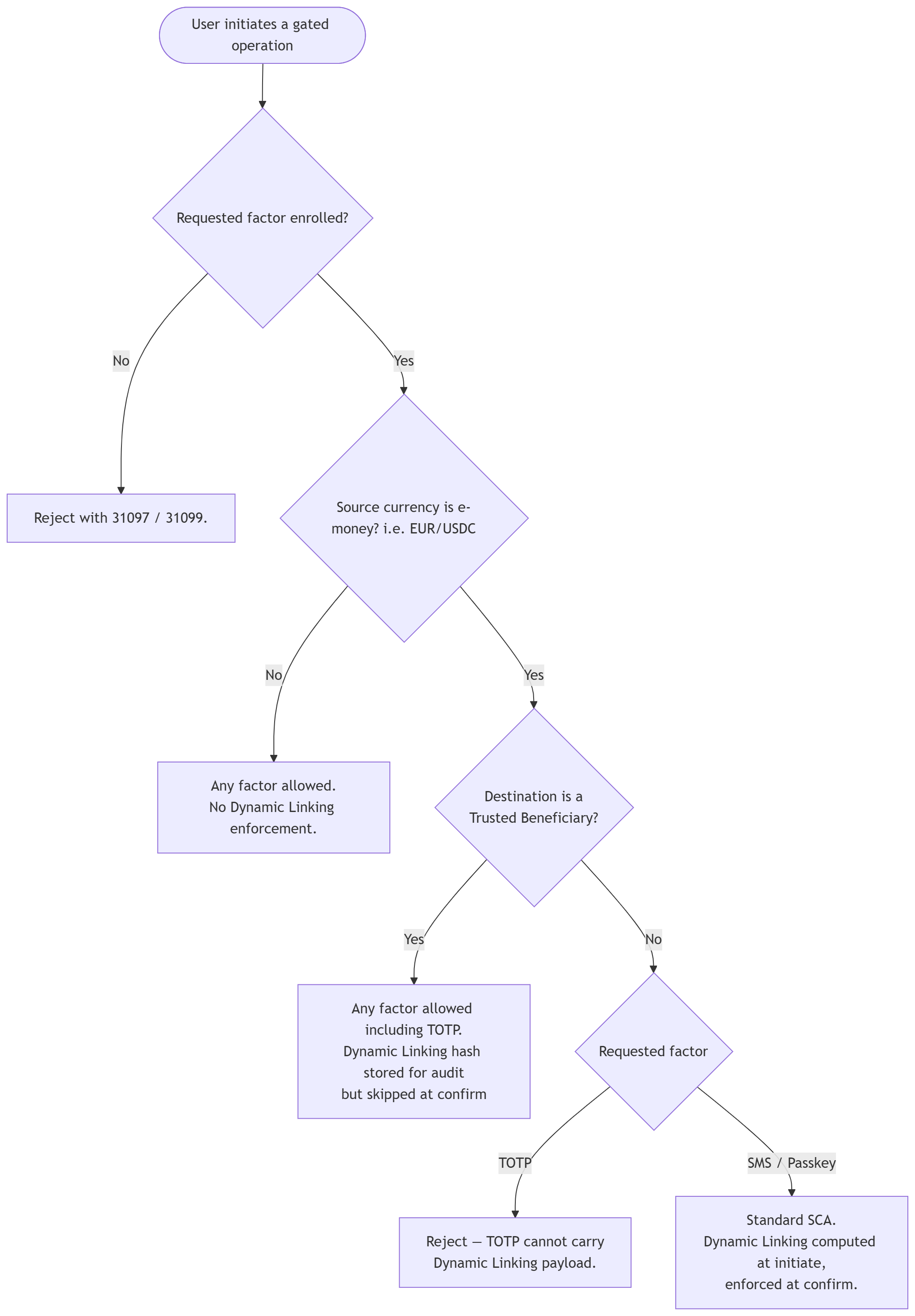
| Send EUR or USDC - beneficiary not whitelisted | SCA | ✓ | ✗ | ✓ | Yes | SMS OTP by default. Passkey requires a separate agreement with LSP EU. TOTP cannot be used (no Dynamic Linking payload). |
| Send EUR or USDC - beneficiary whitelisted | 2FA | ✓ | ✓ | ✓ | — | 2FA may be removed in the future once active-session monitoring is in place. |
| Send other crypto-asset | 2FA | ✓ | ✓ | ✓ | — |
Convert
| Action | Gate | SMS OTP | TOTP | Passkey | Dynamic linking | Notes |
|---|---|---|---|---|---|---|
| Convert from EUR or USDC | SCA | ✓ | ✗ | ✓ | Yes | SMS OTP by default. Passkey requires a separate agreement with LSP EU. TOTP cannot be used. (see below) |
| Convert from other crypto-asset | 2FA | ✓ | ✓ | ✓ | — | 2FA may be removed in the future once active-session monitoring is in place. |
Set up standing order to convert
| Action | Gate | SMS OTP | TOTP | Passkey | Dynamic linking | Notes |
|---|---|---|---|---|---|---|
| Convert from EUR or USDC | SCA | ✓ | ✓ | ✓ | No | Envelope SCA at setup; no per-execution challenge. TOTP is permitted here because the standing-order setup carries no per-debit amount/payee to dynamically link. |
| Convert from other crypto-asset | 2FA | ✓ | ✓ | ✓ | — |
Set up standing order to convert and pay out
| Action | Gate | SMS OTP | TOTP | Passkey | Dynamic linking | Notes |
|---|---|---|---|---|---|---|
| Convert EUR/USDC and pay out to other crypto-asset | SCA | ✓ | ✓ | ✓ | No | |
| Convert EUR/USDC and pay out to USDC or EUR -beneficiary not whitelisted | 2×SCA | ✓ | ✓ | ✓ | No | Two independent SCAs required. One authorises whitelisting the beneficiary; the other authorises the rest of the instruction. Two different second factors must be used where possible; otherwise two separate SMS OTPs. |
| Convert EUR/USDC and pay out to USDC or EUR -beneficiary whitelisted | SCA | ✓ | ✓ | ✓ | No | Trusted Beneficiary carve-out: a single SCA at setup is sufficient. |
| Convert from other crypto-asset and pay out to other crypto-asset | 2FA | ✓ | ✓ | ✓ | — | |
| Convert from other crypto-asset and pay out to USDC or EUR - beneficiary not whitelisted | 2×SCA | ✓ | ✓ | ✓ | No | Same rule as above: one SCA to whitelist, one SCA for the rest. Different factors preferred; two separate SMS OTPs accepted. |
| Convert from other crypto-asset and pay out to USDC or EUR - beneficiary whitelisted | SCA | ✓ | ✓ | ✓ | No |
Why TOTP is ✗ on per-transaction EUR/USDC sends and converts
PSD2 Article 97(2) requires the authentication code to be dynamically linked to the amount and the payee. The code displayed by an authenticator app is computed only from a clock and a shared secret - it has no input from the transaction parameters and therefore cannot satisfy this binding. SMS OTP and passkey-issued challenges can whereas TOTP cannot. The implementation enforces this with a server-side reject (
INVALID_FACTOR_FOR_REGULATED_DEBIT) and the/wallets/send/initiate/*endpoints surface the rejection at request time.The same legal text grants exemptions for trusted beneficiaries (the "Row 7" carve-out) and for standing orders that have no per-execution amount/payee to link. In both cases TOTP becomes permissible, which is why the matrix lights it up on those rows.
SCA Workflow
Managing passkeys
A user may enrol up to five passkeys - one per device or ecosystem - so that losing a device does not mean losing the factor. Pass an optional displayName ("iPhone", "Work laptop") on /user/passkey/register/start; it is echoed back by /user/passkey/list so the user can tell their passkeys apart. A sixth registration is rejected with 100004.
Removing a passkey is itself an SCA event: the user must prove possession of an enrolled factor before the credential goes away. The removal is a two-step ceremony:
POST /user/passkey/deletewith thecredentialIdfrom the list endpoint. Nothing is deleted yet. The response binds a 10-minute challenge to that credential and lists the factors the user can confirm with inavailableVerificationMethods:passkey(any enrolled passkey, including the one being removed - the WebAuthn assertion options are returned inline, no separate approval ceremony),totpwhen an authenticator app is enrolled, andsmswhen a mobile number is on file (an OTP is dispatched).POST /user/passkey/delete/confirmwith thechallengeId, the chosenverificationMethod, the clientip, and the proof:codefor SMS or TOTP, ororigin+credentialfor passkey. On success the bound credential is removed and the refreshedmultiFactorAuthstate is returned; removing the last passkey dropspasskeyfromenrolledMethods.
One challenge authorises one deletion and cannot be redirected to a different credential. Confirming a consumed challenge returns 999998; an expired or unknown challengeId, or a factor the challenge did not offer, returns 999995; a wrong code returns 999997. If the proof was accepted but the removal failed downstream, the same challengeId can be confirmed again with a fresh proof.
The business endpoints /business/passkey/delete and /business/passkey/delete/confirm follow the same contract keyed by businessId.
Removal needs a working factor by design. A user who can no longer answer any challenge goes through the liveness-gated 2FA reset instead, which replaces the factor rather than removing it.
WebAuthn Configuration Prerequisites
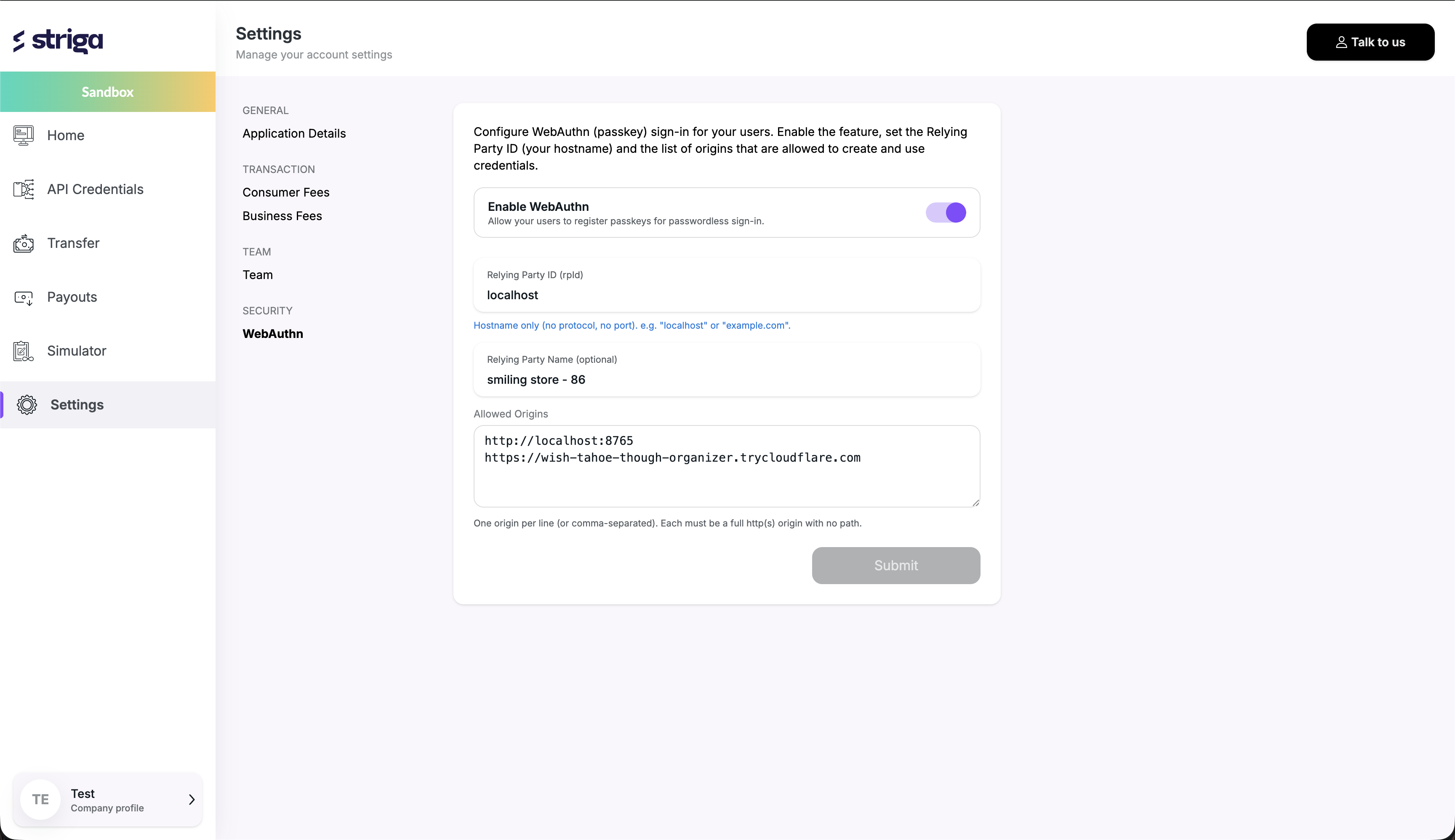
Before implementing the Passkey (WebAuthn) flow, you must configure the required verification form in the Striga Portal.
Navigate to:
Settings → WebAuthn → Questionnaires
Create a verification form that will be used during the passkey reset process.
Important: The passkey reset flow requires a verification form to be configured before users can complete the reset process successfully.
Example Configuration