

The diagram below shows a high-level workflow of how your application user journey at the least must enforce in order to comply with SCA requirements.
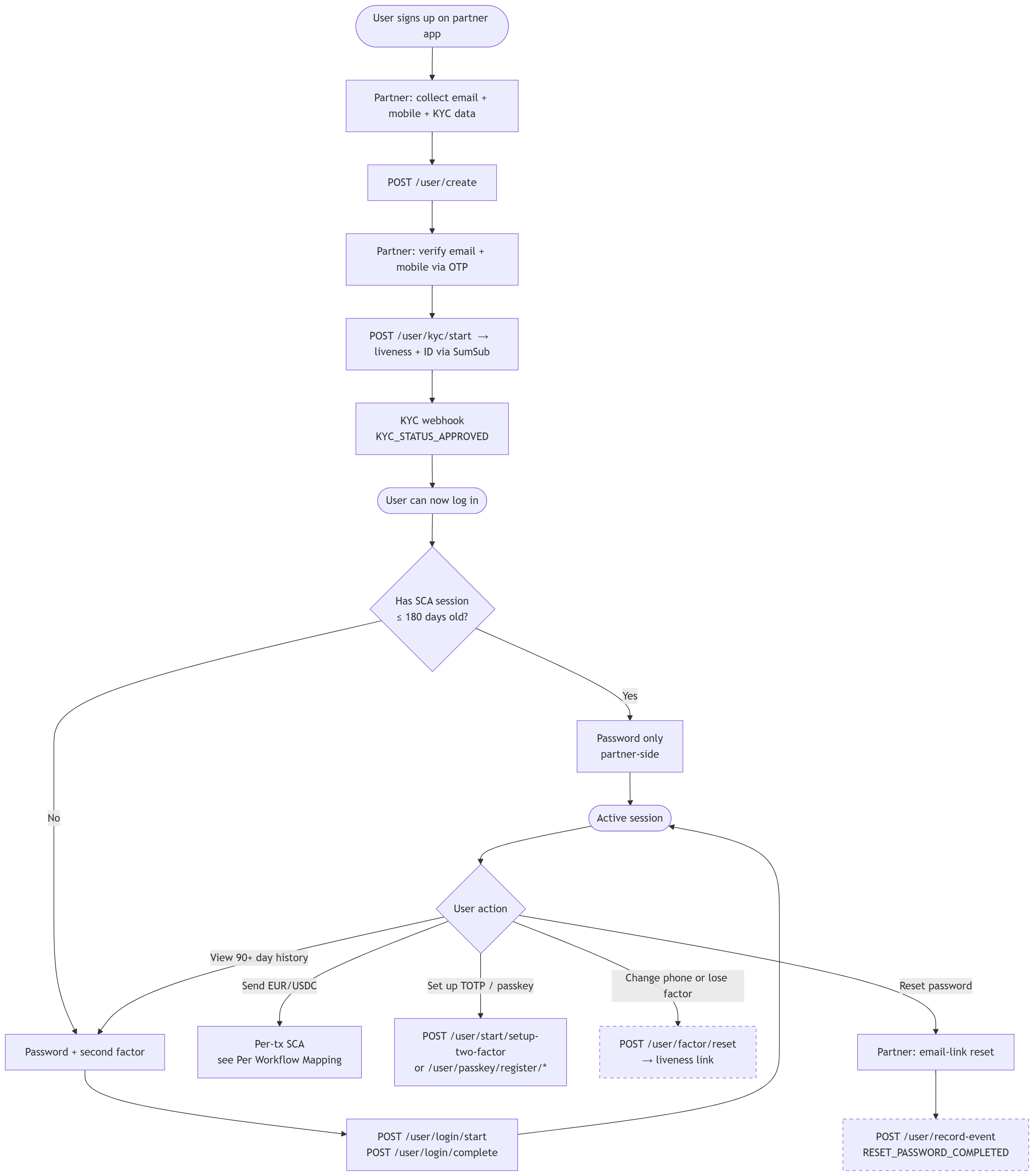
Instead of enforcing a UI component which will authenticate Striga (LSPEU) directly with the end user, such that we manage sessions, we have taken a legally heavier approach in not interfering directly with whatever user/password management flows your application may already have setup. This is the approach developed by our legal/compliance team and requires regulatory notification on our end, however preserves UX with the least invasive possible components.
In outsourcing password management and user session management to you, us as the licensed provider in the flow are at risk and depend upon your implementation of these APIs to remain compliant. Namely, please ensure to note the following -
- We do not manage user passwords and hence will need to be made aware when a user successfully completes a forgot password workflow on your application or has a failed login attempt. We are legally required to track failed login attempts to enforce a time based lockout and expect your application to hit our
/user/record-eventto notify us of these events. More information will be shared by compliance about what happens in various scenarios as part of our onboarding process. - Please do not at any point in time store TOTP/Passkey secrets and attempt to circumvent SCA provisions by acting on behalf of the user. This comes with high fines and penalties.
- Ensure the implementation of a strong password/OAuth/login mechanism and industry best practices to secure user accounts.
- When a user wishes to reset their SMS OTP factor (i.e. change mobile number), their TOTP factor or Passkey, we are required to enforce that it is the user acting on their own behalf, prompting an automated liveness check on such events.
- We recommend using the concept of "Trusted Beneficiaries" and "Standing Orders" to enable the smoothest possible UX for automated flows.
Lifetimes and limits
| Item | Value |
|---|---|
| SCA session | 180 days |
| History sub-window | 90 days |
| SMS code | 5 minutes |
| TOTP / passkey challenge | 10 minutes |
| Attempt cap per challenge | 5 |
| Resend (SMS) | Twilio-managed; deduped per channel |
| Resend (passkey / TOTP) | Not supported (31100 for passkey; TOTP has no server challenge) |
Error codes
| Code | Meaning |
|---|---|
30031 | Invalid verification code, or Dynamic Linking mismatch (the response reason field disambiguates). |
30043 | User is suspended; SCA flows reject. |
30070 | SCA session required or expired. Re-authenticate via /user/login/start + /user/login/complete. |
30073 | whitelistedIbanId or whitelistedAddressId not found or not ACTIVATED. |
30074 | verificationMethod was supplied but the application's scaEnabled is not true. |
30075 | Address trust is only supported for USDC, USDC_POLYGON, USDC_SOL. |
31097 | Requested factor is not enrolled for this user. |
31099 | Factor is not in the application's allowedScaMethods. |
31100 | Resend not supported for passkey. |
64009 | Whitelisted USDC address must be trusted before creating a standing order. |
64010 | Standing-order factor not enrolled. |
64011 | Whitelisted IBAN must be trusted before creating a CRYPTO_TO_FIAT standing order. |